
Limited‑Time Event
Where Winds Meet The Great Faceologist – How to Join, Tag, and Submit
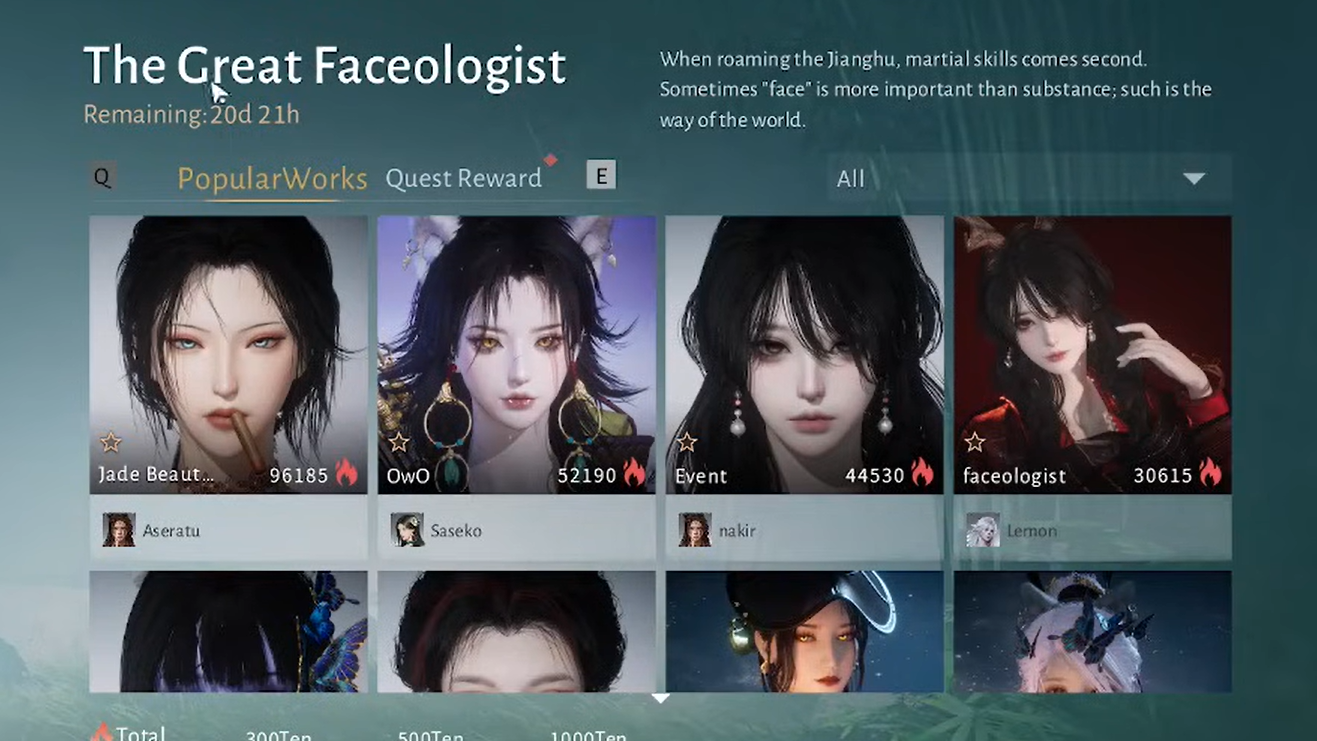
Where Winds Meet The Great Faceologist is a limited‑time face & make‑up customization contest. Your photo/upload only counts if it is published from Edit Face and manually tagged with [The Great Faceologist].
- • Photo didn’t count? It’s almost always the missing event tag or the wrong upload path.
- • TL;DR: Appearance → Edit Face/Makeup → Preview → Upload → tick the event tag → Publish.
- • Outfit gallery posts never count for The Great Faceologist.
- • Daily cap is low, so don’t waste uploads without the tag.
On this page
Quick Facts
Official name
The Great Faceologist
Event window
Dec 11–31, 2025 (UTC)
Requirements
Level 5 + complete Qinghe main chapter “Another New Wing”
Event type
Limited-time face & make-up customization contest
Where to submit
Appearance → Edit Face / Makeup → Preview → Upload to Gallery
What counts
Only uploads tagged with [The Great Faceologist]
Daily cap
Up to ~5 appearance uploads per day (shared limit)
Rewards
Event quests + popularity milestones (often includes Echo Jades and cosmetics/decorations; check Event Center for your server)
Rewards & Event Quests
Where Winds Meet The Great Faceologist rewards typically come from event quests (upload, apply/favorite/comment/share) and popularity milestones. Exact rewards can differ by server/region, so open the in‑game Event Center to see the full list.
- • Common reward types include Echo Jades, coins, decorations, and cosmetic items.
- • To confirm your submission counted, open the event page and check the “Mine/My Entries” tab for your post and popularity.
TL;DR Submission Route
- • Open Appearance from the main menu, then switch to the bottom “Appearance” tab (not Outfits).
- • Go to Edit Face (or Makeup), pick or tweak a preset, then Preview and Upload to Gallery.
- • In the upload dialog, manually tick the [The Great Faceologist] tag (this is what makes it a "The Great Faceologist" entry).
- • Outfit gallery uploads never count for this event.
How to Submit on PC
Make sure you’re in Edit Face, not Outfit galleryOpen Appearance (wardrobe)
Press Esc → Appearance to enter the wardrobe.
Switch to base Appearance tab
Click the Appearance button at the bottom of the wardrobe to move from outfits to your character’s base look.
Enter Edit Face
Click Edit Face in the lower-right. The camera zooms in on your face presets/sliders.
Choose or adjust a look
Pick a face preset or go to Makeup and tune details. Save if you want a new preset.
Preview your shot
Click Preview, pick an outfit/background if prompted, and frame your character’s face the way you want it to appear in the gallery.
Upload to Gallery
Press R (or the on‑screen Upload prompt) to open the gallery upload dialog.
Add title/description
Fill in a title and optional description. These show publicly in the gallery.
Tick the event tag
Under the description box, click the [The Great Faceologist] tag so it highlights. It is not always pre‑selected.
Publish
Press the publish key (Space by default). Your entry is now counted for the event.
Screenshots (click to zoom)
Tip: scroll/pinch to zoom, drag to pan.
How to Submit on Console
- Pause menu → Appearance to open wardrobe.
- Move to the bottom Appearance option to switch from outfits to base appearance.
- Select Edit Face. If missing, back out and re‑enter, or restart the game.
- Pick a face/make-up preset → Preview → Upload to Gallery.
- Scroll in the upload dialog until you see [The Great Faceologist] tag; confirm once so it changes state.
- Publish. If the tag only shows on Makeup uploads, submit from that tab instead.
Why Outfit Gallery Uploads Don’t Count
Where Winds Meet separates Outfit posts from Appearance (face/make‑up) posts. The Great Faceologist contest is tied only to Appearance uploads, so the event tag never appears on the outfit upload screen.
The Great Faceologist FAQ
Where do I start The Great Faceologist?
Open the in-game event center if you see it, or use the Gallery/Upload flow from Appearance → Edit Face. The key is that your final upload must be tagged for the event.
What counts as a "The Great Faceologist" submission?
Only Appearance uploads (face/make-up) published from Edit Face (or the Makeup tab) count, and only if you tick the [The Great Faceologist] tag before you publish.
My Faceologist photo didn’t count — why?
In Where Winds Meet The Great Faceologist, most “didn’t count” cases are either (1) publishing from the Outfit gallery path or (2) forgetting to tick the [The Great Faceologist] tag under the description before you publish. Re-submit from Edit Face/Makeup and confirm the tag is highlighted.
Why is the [The Great Faceologist] tag missing?
Try uploading from the Makeup tab, fully close/reopen Appearance, or restart the game client. Also confirm you’re not uploading from the Outfit gallery path.
How many The Great Faceologist entries can I upload per day?
The daily cap is shared with other appearance uploads and is low (often around five). Double-check the tag is selected so you don’t waste uploads on untagged posts.
Common Issues & Fixes
The event tag is missing
- • Try uploading from the Makeup tab inside Edit Face (many players only see the tag there).
- • Close Appearance completely and reopen via Esc/Pause, then navigate back to Edit Face.
- • Restart the client; the tag can fail to load right after an update.
- • Double‑check you are not in the Outfit gallery path.
“This work is already applied and cannot be uploaded”
- • Nudge a small slider/color and save as a new preset, then upload that version.
- • Switch to another preset, upload it, then switch back.
- • This error only blocks re‑uploading an identical look; it doesn’t affect event eligibility.
You hit the daily upload cap
- • The cap is shared with other appearance uploads; expect about five posts/day.
- • Always verify the event tag is highlighted before publishing so you don’t waste slots.
- • Use Preview to check framing/lighting before committing an upload.
Sources (optional)
If you want the official patch context or an external reward table to cross‑check, these references are useful. (Rewards can vary by server/region — always trust your in‑game Event Center first.)